
You’re probably in the same spot a lot of business owners hit after launching Google Ads. The clicks are coming in. Search terms look relevant. Maybe the dashboard even feels busy enough to suggest progress. But the phone isn’t ringing the way it should, form submissions feel inconsistent, and nobody can tell you which campaign is actually producing paying customers.
That’s the core problem. Not traffic. Not impressions. Unclear revenue. Without a proper Google Ads conversion tracking setup, you’re not managing ads. You’re funding experiments with no reliable feedback loop. That’s how good businesses keep spending on the wrong keywords, pause ads that were working unnoticed, and leave easy wins to competitors who track calls, forms, purchases, and offline sales correctly from the start.
If you’re already comparing agencies or looking for a Google Ads agency for small business growth, prioritize fixing the measurement in any discussion. Before scaling budget, fix the measurement.
Table of Contents
- Your Google Ads Are Working But Are They Making You Money
- What Google Ads Conversion Tracking Actually Measures
- A Google Ads Conversion Tracking Setup for Local Leads
- Common Mistakes That Make Your Tracking Data Useless
- Advanced Tracking for a Competitive Edge
- Stop Guessing and Start Growing Your Business
Your Google Ads Are Working But Are They Making You Money
A common scenario looks like this. A local service business launches search campaigns, sees clicks climb, and assumes momentum is building. Then the owner asks a simple question: which campaign generated actual leads? Nobody has a clean answer.
That’s what wasted ad spend usually looks like in real life. It doesn’t always show up as a dramatic failure. It shows up as uncertainty, mixed signals, and monthly reports full of activity that never connect clearly to booked jobs, consultations, or sales.
A proper Google Ads conversion tracking setup closes that gap. It tells you whether a click turned into a phone call, a quote request, a checkout, or nothing at all. Without that layer, your account gets optimized around surface metrics. Click-through rate looks fine. Cost per click might seem manageable. Meanwhile, the campaigns that attract low-intent visitors keep getting more budget because the platform has never been taught what a real win looks like.
Why this hurts more than most owners realize
The damage usually comes from three decisions:
- Scaling the wrong campaign because it gets traffic, not customers
- Cutting the wrong keyword because the sale happened offline and was never connected back
- Trusting platform automation too early without feeding it real conversion signals
Practical rule: If Google Ads can’t see what counts as a lead or sale in your business, it can’t optimize for profit.
That’s why experienced advertisers review setup before they review performance. If the tracking is wrong, every optimization that follows is built on bad input. For a business trying to win local searches, near me intent, or city-based service traffic, that’s expensive.
For a useful outside perspective on setup fundamentals, these pro Google Ads conversion insights break down why tracking matters before campaign decisions do. If your current account feels active but unpredictable, that’s the first issue to solve.
If you want to see how this fits into full campaign management, review a small business PPC management approach that connects tracking, bidding, and lead quality instead of treating them as separate tasks.
The businesses that lose the most
The businesses hit hardest are usually not beginners. They’re often established companies already spending money every month. They know ads should work. They may even be getting leads. They just can’t prove what’s driving them.
That’s where conversion tracking stops being a technical box to check and becomes a growth decision. Once the account can measure lead actions correctly, you can finally answer the only questions that matter. Which campaigns deserve more budget? Which keywords bring buyers instead of browsers? Which landing pages need to be fixed because traffic is arriving but not converting?
What Google Ads Conversion Tracking Actually Measures
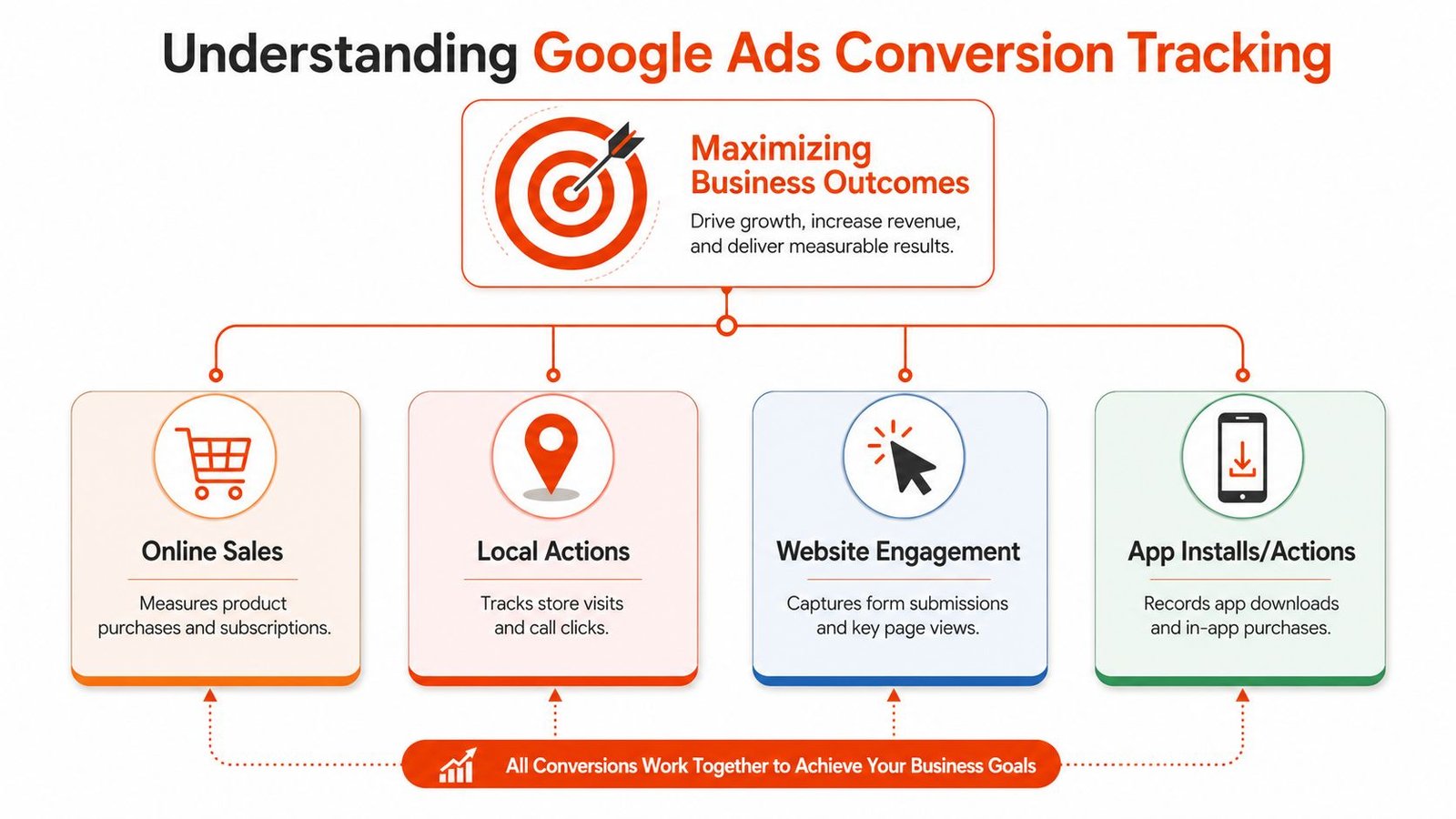
Google Ads conversion tracking measures the actions that matter after someone clicks your ad. For most businesses, that means a lead form, a phone call, an appointment request, a purchase, or another action that moves a prospect closer to becoming a customer.
That sounds simple, but the value is in choosing the right actions. Not every click is meaningful. Not every page visit deserves to be called a conversion. A clean setup separates business outcomes from casual activity.
Primary conversions tell Google what matters
Primary conversions are the actions you want Google Ads to optimize toward. These usually include:
- Lead form submissions that create a real inquiry
- Phone calls from ads when a prospect contacts your business directly
- Calls from the website after someone lands and decides to reach out
- Purchases or booked appointments when the action has direct revenue impact
These are the signals that influence bidding strategies. If you tell Google a quote request is important, the system can learn from that. If you tell Google that a page scroll or a visit to the contact page is equally important, the account starts chasing weak intent.
Secondary conversions help you read intent without polluting bidding
Secondary conversions still matter, but they serve a different purpose. They help you understand user behavior without telling Google to aggressively optimize for that behavior.
Examples include:
- Key page views such as pricing or service detail pages
- Download actions for guides, menus, or brochures
- Engagement events that suggest interest but not sales readiness
This distinction matters more than most businesses realize. It’s one of the main reasons one account feels sharp and predictable while another feels noisy and confusing.
A conversion action should reflect business value, not just user movement.
A restaurant owner might care about online orders, reservation requests, and calls for private events. A law firm might care about consultation requests and qualified calls. A local contractor might track quote forms, call clicks, and offline job bookings imported later from a CRM. The setup should reflect how your business wins customers.
If you already use analytics tools and want tighter event tracking on the site side first, this guide on setting up Google Analytics 4 correctly is a practical companion to Google Ads measurement.
For businesses that live and die by operational outcomes, not vanity dashboards, this piece on OrderOut insights on restaurant performance is useful because it reinforces the same principle. Measure actions tied to real business performance, not just activity.
A Google Ads Conversion Tracking Setup for Local Leads
Most local businesses don’t need a complicated setup first. They need a correct one. The core job is simple: track the actions that create revenue, pass those signals cleanly into Google Ads, and make sure nothing is counted twice.
The best starting point for most lead generation accounts is Google Tag Manager. It gives you flexibility, cleaner change control, and easier troubleshooting than hard-coding tags throughout a site. Hard-coded tracking can work, but it often turns into a mess when forms change, websites get redesigned, or multiple vendors touch the same pages.

Contact forms should fire on real submissions
A lot of accounts claim to track leads, but they’re really tracking button clicks. That’s not the same thing.
If someone clicks “Submit” and the form throws an error, you don’t have a lead. If a spam bot triggers the event, you don’t have a lead. If the thank-you page never loads because the form works asynchronously, the old tracking method breaks.
A stronger setup usually includes:
- A real form success event pushed through Google Tag Manager
- A dedicated thank-you state or confirmation event instead of a simple click trigger
- Testing in preview mode to confirm the tag fires only after successful submission
For local businesses, this is often the main conversion that drives the account. If it’s wrong, every bid strategy built on it will drift.
Phone call tracking needs two layers
Phone tracking is where many small business accounts fall apart. They track calls from call extensions or call ads, but ignore calls from the website. That creates a false picture of performance.
You need to think about calls in two buckets:
| Call source | What it tells you |
|---|---|
| Calls from ads | Someone contacted you directly from the ad unit |
| Calls from website visits | Someone clicked the ad, reviewed your site, then decided to call |
For many local service companies, website calls are the more valuable signal because they reflect a visitor who looked at services, service area, pricing cues, or trust elements before reaching out.
What works: Track both ad-based calls and website-based calls.
What doesn’t: Assuming ad call reporting captures your full lead picture.
If location matters to your campaigns, your setup should also match your targeting logic. A business running ads in Miami, North Miami, or nearby service areas needs campaigns, landing pages, and conversion tracking aligned. This guide to Google Ads location targeting for local campaigns helps connect those pieces.
Ecommerce tracking must send real value
For ecommerce, the setup changes. A purchase isn’t just a conversion. It has value. That value should pass into Google Ads dynamically so the platform can optimize based on transaction quality, not just volume.
The difference matters. Ten low-value purchases and one high-value purchase shouldn’t be treated as equal outcomes. When revenue values are missing, Google can still optimize, but it’s doing so with incomplete context.
A practical ecommerce setup should include:
- Purchase event tracking tied to the confirmation step
- Dynamic conversion value pulled from the actual order
- Currency handling when needed
- Testing that confirms values pass correctly
Where businesses usually need help
A lot of owners can follow a tutorial far enough to install a tag. That’s not the hard part. The hard part is deciding what to count, how to count it, and how to protect the integrity of the data once campaigns, landing pages, call tools, and consent requirements all interact.
That’s why the right Google Ads conversion tracking setup is not just implementation. It’s measurement design. For local lead generation, that design decides whether you can trust your reports enough to increase budget confidently.
Common Mistakes That Make Your Tracking Data Useless
Bad tracking doesn’t just hide good performance. It creates false confidence. That’s worse, because now you’re making budget decisions with numbers that look precise but aren’t reliable.
The most common DIY tracking problems are easy to miss in the beginning. The account still records conversions. Reports still populate. But the data underneath is distorted.
What breaks first in DIY setups
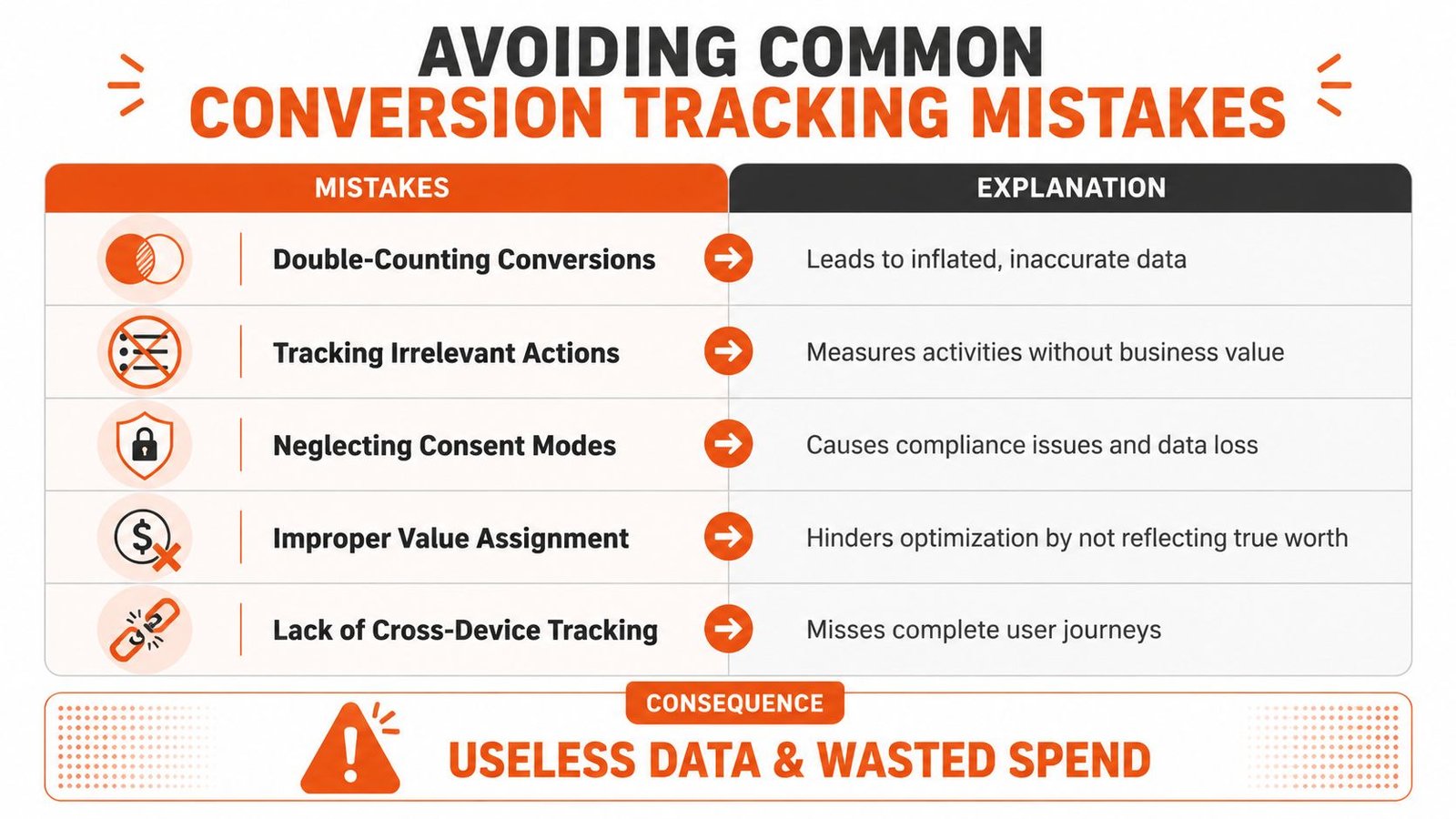
Some mistakes show up repeatedly across local business accounts:
Double-counting leads
A form submission fires once through Google Ads, again through an imported analytics event, and maybe a third time through another plugin. The dashboard looks healthy, but the lead count is inflated.Tracking irrelevant actions as primary goals
Contact page views, button clicks, and shallow engagement events get promoted into the main conversion column. Bidding starts optimizing for low-value actions.Ignoring consent mode requirements
If privacy settings aren’t handled correctly, data collection becomes patchy. That can create blind spots that owners misread as campaign weakness.Using the wrong attribution model for the account
If the setup gives all credit to the last touch in a path where multiple clicks matter, some campaigns get too much credit and others get starved.Skipping offline conversion imports
This is a major gap for service businesses that close deals by phone, in person, or inside a CRM. Google sees the lead but never learns which leads turned into actual customers.
When bad data creates bad decisions
Here’s what happens next. A business owner opens Google Ads, sees one campaign with “better” conversion numbers, and moves more budget into it. The problem is those conversions may be cheap because they’re weak. Another campaign may appear expensive because its phone leads and offline wins were never connected back.
That’s how profitable campaigns get cut.
If the conversion action is wrong, the cost per lead is wrong. If the cost per lead is wrong, the budget decision is wrong.
Landing pages make this even messier. If your page design causes duplicate thank-you events, broken form states, or poor handoff into tracking tools, the reporting suffers. A conversion-focused lead generation landing page design should support measurement, not sabotage it.
A quick audit usually reveals whether your account is clean or compromised. Look for mismatched lead counts between Google Ads, your forms, your call logs, and your CRM. If those systems tell different stories, trust the discrepancy. Something is off.
Advanced Tracking for a Competitive Edge
A basic setup is enough to start. It’s not enough to stay ahead, especially in crowded local markets where multiple advertisers bid on the same service terms and everyone claims to be the best option near me.
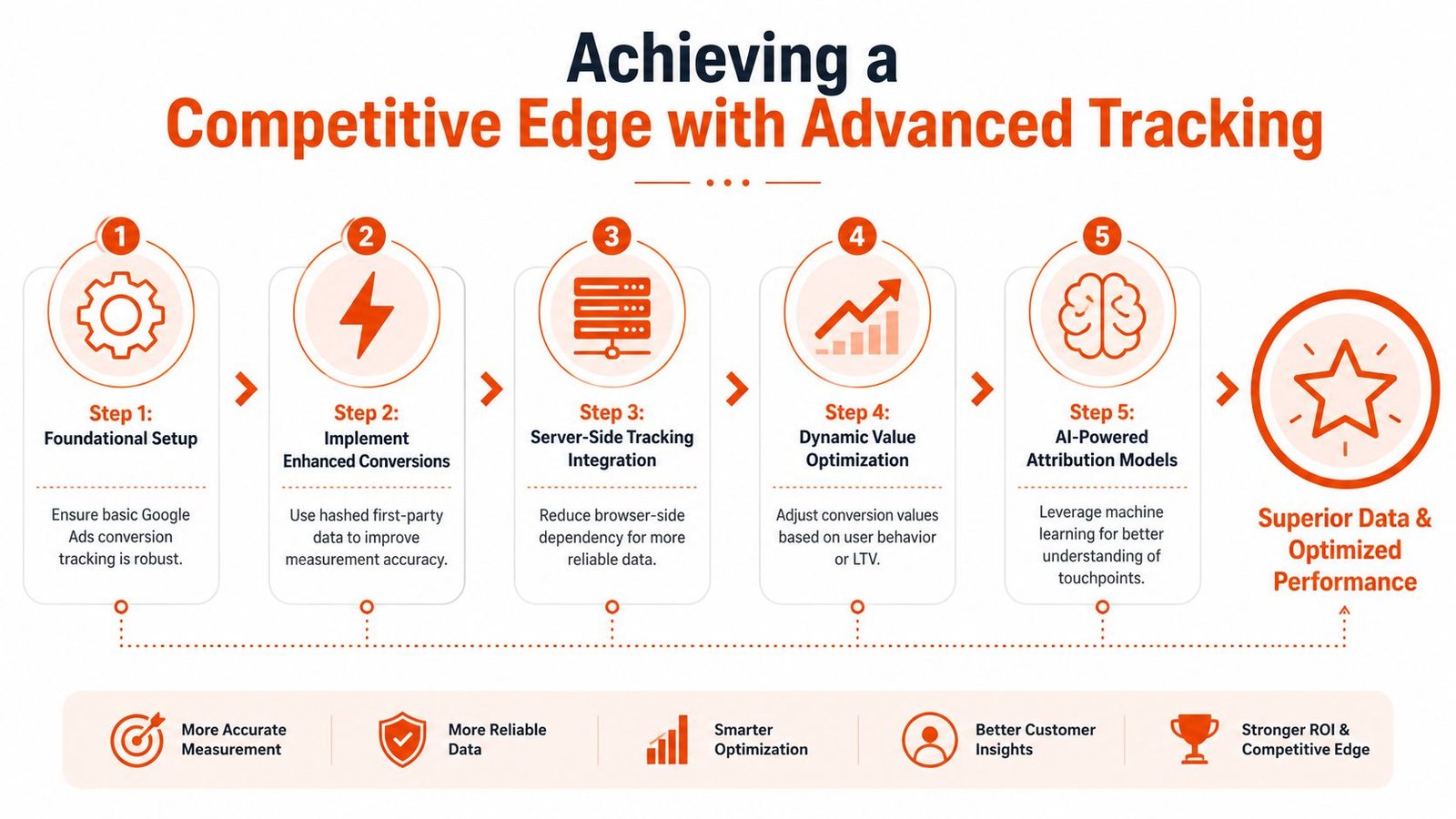
The accounts with the strongest long-term performance usually move beyond default tracking. They layer in better data recovery, better attribution, and better control over how information is collected and sent.
Enhanced conversions are no longer optional
Enhanced Conversions help recover measurement quality by using hashed first-party data, such as email addresses or phone numbers submitted during a conversion. That gives Google stronger matching signals than browser-only tracking can provide on its own.
For advertisers dealing with privacy changes, browser limitations, and incomplete user journeys, this matters. A standard setup may miss part of the picture. Enhanced Conversions can tighten that gap and improve how bidding systems learn.
Server-side tagging pushes this further. It gives businesses more control and often improves reliability by reducing dependence on browser-side behavior alone. It’s not necessary for every account on day one, but for competitive lead generation or higher-spend ecommerce campaigns, it often becomes worth the investment.
If you want a technical companion piece on implementation logic inside Tag Manager, this guide for D2C brand analytics is a useful reference for thinking through cleaner tag deployment.
Better attribution changes how you scale
Attribution decides which touchpoints receive conversion credit. That sounds abstract until budget is involved.
A last-click view can make your account look simpler than it really is. It often gives too much credit to the final interaction and hides the role of earlier searches, repeat visits, and supporting campaigns. Data-driven attribution usually offers a more realistic view of how people actually convert across multiple touchpoints.
For business owners, the takeaway is straightforward:
- Basic tracking tells you if leads happened
- Advanced tracking helps explain why they happened
- Better attribution helps you scale without overfunding the wrong campaigns
Stronger measurement doesn’t just improve reporting. It improves the quality of every optimization decision after reporting.
That’s where a lot of agencies stop too early. They install a conversion tag, call it complete, and never revisit the setup as privacy standards, bidding behavior, and customer journeys change. Businesses that keep refining measurement usually make better use of the same ad budget.
Stop Guessing and Start Growing Your Business
At this point, the choice is simple. You can keep running ads with partial data, uncertain lead sources, and reports that don’t line up with your actual sales process. Or you can build a Google Ads conversion tracking setup that shows which clicks become calls, which forms become opportunities, and which campaigns deserve more investment.
That shift changes everything. It affects bidding, landing pages, keyword decisions, and the confidence to scale. It also removes a lot of frustration. Once the data is trustworthy, the account becomes much easier to manage because you’re no longer arguing with guesswork.
What a serious setup should include
If you’re evaluating agencies or comparing providers, look for a process that includes:
- Conversion planning based on your business model, not a generic template
- Google Tag Manager implementation where flexibility and testing matter
- Call tracking coverage for both ads and website visitors
- Primary and secondary conversion design so automation focuses on true lead outcomes
- Value tracking or offline imports when revenue happens after the first inquiry
- Ongoing validation after site updates, form changes, or campaign expansion
Can you do some of this yourself? Yes. Many owners can get part of the way there.
Should you trust a partial setup with your ad budget? Usually not.
A campaign can survive weak ad copy for a while. It can survive an average landing page while you improve it. It cannot scale profitably for long when the measurement layer is flawed. That’s where waste hides.
If your website also needs stronger performance after the click, this guide on improving website conversion rates is the next practical step because better tracking and better page conversion work best together.
Miami is competitive. Local search is competitive. Service categories with urgent buyer intent move fast. If your tracking is still incomplete, every week you delay makes optimization slower and your competitors easier to fund.
If you want a clear answer on whether your current setup is helping or hurting your campaigns, contact VIP TECH CONSULTING and schedule a strategy conversation. A clean tracking setup gives you a reliable path to more calls, better leads, and smarter growth.